> For the complete documentation index, see [llms.txt](https://freegrow-1.gitbook.io/product-docs-en/llms.txt). Markdown versions of documentation pages are available by appending `.md` to page URLs; this page is available as [Markdown](https://freegrow-1.gitbook.io/product-docs-en/en-growspace-studio-api/api-common-guide.md).
# API Common Guide
## 📢 Overview
This API allows external systems to **create, read, update, and delete** map and place information.\
To use the API, you must obtain a valid **API key**.
All requests and responses are based on the **JSON** format.
{% hint style="info" %}
This API is **continuously updated** to improve quality and functionality. As a result, some features may change or become deprecated over time.
{% endhint %}
***
## 📃 API Common Guide Structure
The API Common Guide includes the following sections:
* Place
* Get Place UID List
* Get Place Details by UID
* Update Place Details by UID
* Map
* Get Project GeoJSON
* Get Floor GeoJSON
* Get Navigation Path
* Set Map Color by Place
***
## 🔗 Base URL
The URL for the Growspace API follows the format below.
```json
https://space.api-freegrow.com
```
***
## 🔐 API Authentication
To use the API, you must include your issued **API Key** in the request header.\
You can obtain an API Key by following the steps below.
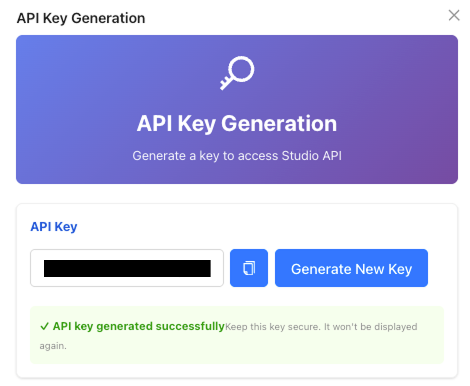
✅ How to Issue an API Key
1. Log in or Sign up
* If you don’t have an account, please sign up first.
* After logging in, you will be redirected to the home screen.
2. Select a Project
3. Click the profile menu at the top right corner
* On the project detail page, click the profile icon again in the top right.
* From the dropdown menu, select **\[API Key Generate]**.
* An API Key will be automatically issued and displayed on the screen.
* You can copy and use the key as needed.
* When a new API Key is issued, the previously issued key becomes invalid.
🔑 API Authentication Method
When making an API request, you must include your **API Key** in the `api-key` header as shown below.
```json
api-key : {YOUR_API_KEY}
```
Example :
```json
curl -X GET https://space.api-freegrow-test.com
-H "{YOUR_API_KEY}"
```